Meetup Alternatives: Why Organizers are Switching in 2026
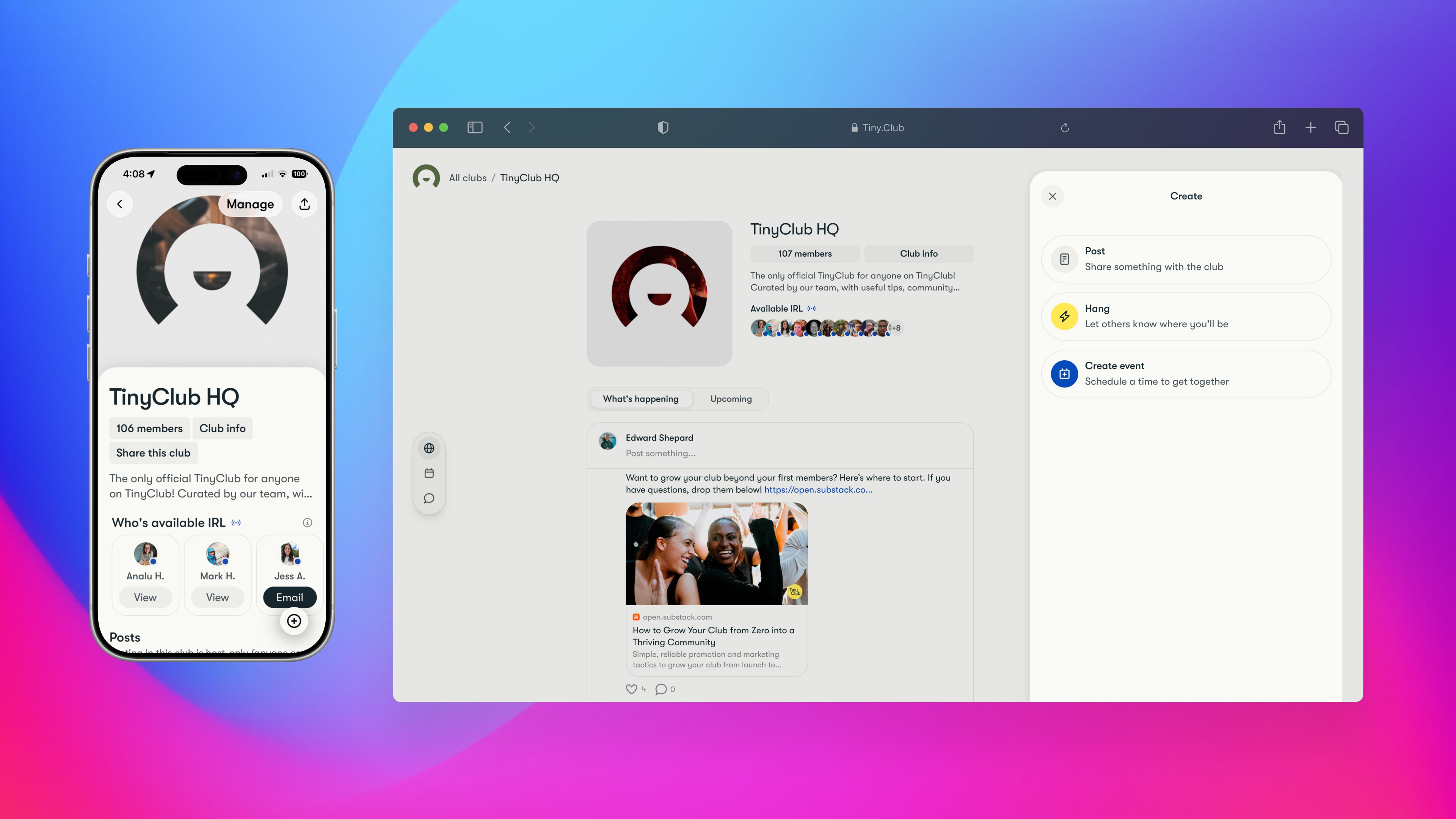
In full disclosure, we built TinyClub

We're one of the platforms on this list, so we're biased. We're also community organizers who spent years jumping between Meetup, Discord, Google Forms, and Venmo before deciding to build something better.

We'll be upfront about where TinyClub wins, where it doesn't, and where another platform might be the smarter choice for your situation.

Everything below is based on publicly available pricing, direct testing, and our own experience running communities. Pricing was verified against each platform's official documentation in February 2026.

At a glance — how meetup comparies


Platform

Monthly Cost

Real-Time Chat

Built-In Payments

Discovery

Best For

Meetup

Free–$99/mo

No

Stripe (on paid plans)

Strong marketplace

Groups that need new members

TinyClub

Free–$99/mo

Yes

Stripe (all plans)

Growing

Recurring communities

Heylo

Free–$199/mo

Yes

Stripe (4–8% total)

Limited

Active groups with payments

Luma

Free–$69/mo

No

Stripe

Limited

Standalone events

Discord + Eventbrite

Free + fees

Yes (Discord)

Eventbrite (~8–16%)

Mixed

Tech communities

Facebook Groups

Free

No

External only

Algorithm-dependent

Casual groups on Facebook

WhatsApp + Venmo

Free

Yes (WhatsApp)

Manual splitting

None

One-off hangouts

Start here: Which platform fits your situation?

If you already know your biggest constraint, this saves you reading 3,000 words.

"I want my group listed in a marketplace with other groups." Start with Meetup. You'll pay $15–35/month for that distribution, but if discovery is your bottleneck, that's the price.

"I already have members. I need one tool to manage them." Look at TinyClub. Chat, events, payments, member management, and a shared library — all in one app. Free to start. You bring your own audience, but if you already have one (or you're growing through your own channels), it's built for this.

"I run standalone events, not an ongoing community." Luma or TinyClub. Luma has clean event pages and is especially popular in startup and tech circles. TinyClub works well here too — and if your one-off events start turning into a regular thing, you already have community infrastructure in place.

"My people are already on Discord / Facebook / WhatsApp." If your Facebook group has lost momentum or you're fighting the algorithm to reach your own members, migrating is worth considering. WhatsApp works for casual coordination but breaks down once you need event pages, payments, or anything beyond chat.

Meetup — Still the default, still rebuilding

Meetup invented this category. But the platform is mid-renovation. Bending Spoons acquired Meetup in January 2024 and has been rebuilding: a new mobile app shipped in December 2025, with a unified organizer/member experience planned for 2026.

They've fixed 400+ bugs. The product is improving, but it's not done. Bending Spoons, which also acquired Evernote and WeTransfer, has followed a similar playbook across its portfolio — raising prices and paywalling previously free features — so the trajectory here is worth watching.

What does Meetup cost in 2026?

Starter (free): One group. Two in-person events per month. Maximum 10 attendees per event. No online events, no recurring events, no payment collection. This is a trial — once you upgrade to any paid plan, you can never go back to Starter.

Standard (starting ~$15–$20/month): Unlimited events and attendees. Up to three groups. Payment processing through Stripe. Online events. Exact pricing varies by billing cycle, region, and platform — check Meetup's pricing page for your location.

Pro ($30–$35/month per group): Analytics, multi-group management, network features. Billed per group — so three groups at $35/month means $105/month.

What does that actually cost you?

Say you run a monthly dinner club with 15 members and charge $20/person:

  • 12 dinners × 15 people × $20 = $3,600/year in ticket sales

  • Meetup Standard: ~$240/year

  • Stripe fees (~3%): $108

  • Total cost: ~$348/year to coordinate 15 people having dinner

You're also paying for chat and payment tools separately, because Meetup doesn't include either natively.

What's missing from Meetup?

Real-time communication. Meetup removed Event Chat and Message Boards in July 2024, replacing them with Event Comments and Group Discussions. These are asynchronous — they feel more like email threads than conversations.

Previously free features are now paywalled. In October 2024, Meetup moved several core features behind its Meetup+ paid subscription. Direct messaging between non-organizer members, full member and attendee lists (with names and photos), and extended profile viewing all require Meetup+. Free members can still message group organizers and see basic profiles, but the peer-to-peer communication that used to happen naturally — carpooling, post-event follow-ups, side conversations — now requires a paid upgrade.

Priority waitlist for paying members. When a popular event fills up, Meetup+ subscribers get bumped ahead of free members on the waitlist. The waitlist used to be strictly first-come-first-served. Now it's pay-to-skip.

Third-party ads throughout the app. Since the Bending Spoons acquisition, free members see display ads on event pages, group pages, and after registering for events. Removing ads requires — you guessed it — Meetup+. Meetup's ad partner reported a 370% increase in iOS ad revenue within three months of launch.

Integrated payments on the free tier. You need Standard or Pro to collect money through the platform.

Who should use Meetup?

Groups that need a steady stream of new members and are willing to pay for distribution. Organizers who can tolerate the paywalled member experience or are already supplementing with outside tools for chat, payments, and coordination.

→ For a detailed side-by-side, see our TinyClub vs. Meetup comparison and migration guide.

TinyClub — One app for chat, events, and payments

We built TinyClub because we we wanted a faster, lighter, simpler way to run our online and IRL communities.

What you get

Native iOS and Android apps with push notifications. Real-time group chat alongside posts, comments, and threaded discussions. Event creation with RSVP tracking and calendar sync. "Hangs" for spontaneous, informal meetups between official events. Built-in payments for both recurring memberships and event tickets through Stripe. Member directory and profiles. Club Library for storing community guidelines, onboarding docs, and shared resources. QR codes for check-in.

Start Here: Which Platform Fits Your Situation?

If you already know your biggest constraint, this saves you reading 3,000 words.

"I need new members to find my group." Start with Meetup. Its marketplace puts your group in front of people actively searching for things to do. You'll pay $15–35/month for that distribution, but if discovery is your bottleneck, that's the price.

"I already have members. I need one tool to manage them." Look at TinyClub. Chat, events, payments, member management, and a shared library — all in one app. Free to start. You bring your own audience, but if you already have one (or you're growing through your own channels), it's built for this.

"I run standalone events, not an ongoing community." Luma or TinyClub. Luma has the best-looking event pages and is especially popular in startup and tech circles. TinyClub works well here too — and if your one-off events start turning into a regular thing, you already have community infrastructure in place.

"My people are already on Discord / Facebook / WhatsApp." It depends on which one. Discord communities with strong engagement are worth keeping — add Eventbrite for ticketing if you need it. But Facebook Groups and Events feel increasingly dated for close-knit, recurring communities, and a growing number of people actively avoid the platform. If your Facebook group has lost momentum or you're fighting the algorithm to reach your own members, migrating is worth considering. WhatsApp works for casual coordination but breaks down once you need event pages, payments, or anything beyond chat.

Meetup — Still the Default, Still Rebuilding

Meetup invented this category. But the platform is mid-renovation. Bending Spoons acquired Meetup in January 2024 and has been rebuilding: a new mobile app shipped in December 2025, with a unified organizer/member experience planned for 2026.

They've fixed 400+ bugs. The product is improving, but it's not done. Bending Spoons, which also acquired Evernote and WeTransfer, has followed a similar playbook across its portfolio — raising prices and paywalling previously free features — so the trajectory here is worth watching.

What does Meetup cost in 2026?

Starter (free): One group. Two in-person events per month. Maximum 10 attendees per event. No online events, no recurring events, no payment collection. This is a trial — once you upgrade to any paid plan, you can never go back to Starter.

Standard (starting ~$15–$20/month): Unlimited events and attendees. Up to three groups. Payment processing through Stripe. Online events. Exact pricing varies by billing cycle, region, and platform — check Meetup's pricing page for your location.

Pro ($30–$35/month per group): Analytics, multi-group management, network features. Billed per group — so three groups at $35/month means $105/month.

What does that actually cost you?

Say you run a monthly dinner club with 15 members and charge $20/person:

  • 12 dinners × 15 people × $20 = $3,600/year in ticket sales

  • Meetup Standard: ~$240/year

  • Stripe fees (~3%): $108

  • Total cost: ~$348/year to coordinate 15 people having dinner

You're also paying for chat and payment tools separately, because Meetup doesn't include either natively.

What's missing from Meetup?

Real-time communication. Meetup removed Event Chat and Message Boards in July 2024, replacing them with Event Comments and Group Discussions. These are asynchronous — they feel more like email threads than conversations.

Previously free features are now paywalled. In October 2024, Meetup moved several core features behind its Meetup+ paid subscription. Direct messaging between non-organizer members, full member and attendee lists (with names and photos), and extended profile viewing all require Meetup+. Free members can still message group organizers and see basic profiles, but the peer-to-peer communication that used to happen naturally — carpooling, post-event follow-ups, side conversations — now requires a paid upgrade.

Priority waitlist for paying members. When a popular event fills up, Meetup+ subscribers get bumped ahead of free members on the waitlist. The waitlist used to be strictly first-come-first-served. Now it's pay-to-skip.

Third-party ads throughout the app. Since the Bending Spoons acquisition, free members see display ads on event pages, group pages, and after registering for events. Removing ads requires — you guessed it — Meetup+. Meetup's ad partner reported a 370% increase in iOS ad revenue within three months of launch.

Integrated payments on the free tier. You need Standard or Pro to collect money through the platform.

Who should use Meetup?

Groups that need a steady stream of new members and are willing to pay for distribution. Organizers who can tolerate the paywalled member experience or are already supplementing with outside tools for chat, payments, and coordination.

→ For a detailed side-by-side, see our [TinyClub vs. Meetup comparison and migration guide].

TinyClub — One App for Chat, Events, and Payments

We built TinyClub because we we wanted a faster, lighter, simpler way to run our online and IRL communities.

What you get

Native iOS and Android apps with push notifications. Real-time group chat alongside posts, comments, and threaded discussions. Event creation with RSVP tracking and calendar sync. "Hangs" for spontaneous, informal meetups between official events. Built-in payments for both recurring memberships and event tickets through Stripe. Member directory and profiles. Club Library for storing community guidelines, onboarding docs, and shared resources. QR codes for check-in.

What does TinyClub cost?

Free: Unlimited events. Up to 400 members. All core features — chat, posts, events, RSVPs, Club Library, discovery, notifications. The platform takes 5% on paid transactions (tickets, memberships). 1% on donations.

Plus ($34.99/month or $349.99/year): Up to 1,000 members. 2 co-hosts. Reduced platform fees (~1% on tickets). Data export. Priority support.

Pro ($99/month or $990/year): Unlimited members. Up to 8 co-hosts. 0% platform fees on paid memberships. Priority support.

Stripe processing (2.9% + $0.30) passes through to the payer on all plans.

What's missing from TinyClub?

Discovery is still growing. You get tools to promote your group — shareable social graphics, printable flyers with QR codes, direct invite links — but you mostly bring your own audience.

Who should use TinyClub?

Running clubs, book clubs, professional networks, creative collectives, fitness groups — any recurring community with people who meet regularly and want real infrastructure with built-in monetization.

→ See Meetup to TinyClub migration guide.

Heylo

What you get: Native iOS and Android apps (plus web access). Event creation with RSVPs, attendance tracking, and waitlists. Group chat organized by topic and by event. Member directory. Paid membership and event ticket collection through Stripe. Photo albums. Email and push notifications. Customizable branding with logos, colors, and custom URLs.

What does Heylo cost?

Free: Unlimited members, admins, and events. Core features included. 500 emails/month. Platform fee on payments: 5% + $0.59 per transaction, plus Stripe processing.

Plus ($19/month): 5,000 emails/month. Reduced payment fees: 4% + $0.49 per transaction.

Pro ($59/month): 20,000 emails/month. Waiver collection. Embedded website events. Priority support. Payment fees: 2% + $0.29 per transaction.

Premium ($199/month): 50,000 emails/month. API access. Dedicated onboarding. Payment fees: 1% + $0.10 per transaction.

Stripe processing (2.9% + $0.30) applies on top of all platform fees.

How Heylo compares to TinyClub

Both platforms handle chat, events, payments, and member management. TinyClub has a Club Library for shared resources, a "Hangs" feature for spontaneous meetups, and lower total fees on the free tier (5% flat vs. Heylo's 5% + $0.59 per transaction). On a $10 event ticket, Heylo's free-plan fee is $1.09; TinyClub's is $0.50.

Heylo has a more established user base, particularly among run clubs and sports leagues. TinyClub is newer but broader in scope, designed for any type of recurring community.

What's missing from Heylo?

Discovery is limited. Like TinyClub, Heylo doesn't have Meetup's marketplace. You bring your own audience.

Some users report app stability issues on Android. App store reviews mention occasional lag and bugs, though the platform has been actively updating.

Who should use Heylo?

Active groups that need event management and payment collection in one place — especially sports leagues.

Luma — Clean Event Pages

Luma builds modern event pages with clean RSVP collection. It's ideal if you want a fast event page and you're running standalone events (not ongoing communities).

What you get

Free for unlimited events and guests. Ticketing through Stripe (like TinyClub). Zoom integration for virtual events. QR code check-ins. Community calendars. Native iOS and Android apps.

Free plan: 5% platform fee on paid tickets. Luma Plus ($69/month, $59/month annual): 0% platform fee. 5,000 weekly email sends.

What's missing from Luma?

Community. Luma is an event tool, not a community platform.

Membership billing. Luma handles tickets and donations, not recurring subscriptions.

Who should use Luma?

Organizers who in the tech and startup world who run occasional or standalone events without needing persistent community features.

Discord + Eventbrite

This is the duct-tape solution for many tech-native communities: run your group in Discord, sell tickets through Eventbrite. It works for some and frustrates others.

Discord

Free. Real-time text, voice, and video channels. Up to 2.5 million members per server (raised from 500K in 2025). Scheduled Events (up to 100 per server). Bots for moderation and automation. Zero payment infrastructure.

Eventbrite

Free to publish. For paid tickets: 3.7% + $1.79 per ticket service fee, plus 2.9% payment processing per order. On a $25 ticket, that's roughly $3.90 in fees — about 15.5%. On a $50 ticket, roughly $5.65 — about 11.3%. Payouts within 5–7 business days.

What's missing?

Integration. Nothing syncs. Your Discord members aren't your Eventbrite attendees unless you manually cross-reference. You're managing two entirely separate ecosystems with no shared membership concept.

Who should use Discord + Eventbrite?

Gaming communities already living in Discord. Organizations that only need ticketing for occasional large events and can tolerate the platform gap.

Facebook Groups — Free but You Don't Own It

Three billion people are on Facebook. If your community already lives there, a Group costs nothing and gets you in front of people who are already scrolling.

What you get

Event creation, posts, comments, polls. Organic reach through members' existing networks. Facebook's recommendation algorithm can surface your group to people with matching interests — when it chooses to.

What's missing?

Native payments (you'll need an external tool). Real-time chat within the group context. Reliable notification delivery — Facebook controls what members see and when. The ability to export your member list or migrate your community elsewhere. A 500-person event invite limit that drops to 50 if your invites get ignored too often.

Who should use Facebook Groups?

Groups where most members are already active on Facebook. But Facebook fatigue is real, and a growing number of people have either left the platform or stopped checking it regularly. If half your members aren't seeing your posts and you're fighting the algorithm to reach your own group, you don't have a community tool — you have a bulletin board in an empty hallway.

WhatsApp + Venmo — The Duct-Tape Approach

Not a platform. Two consumer apps held together by goodwill and one person willing to be the organizer.

WhatsApp

Free. Group chat with events, custom reminders, member tags. File sharing up to 2GB. Up to 1,024 members. Polls. End-to-end encryption.

Venmo

Free for person-to-person payments. Group expense splitting for up to 30 members. No ticketing, no invoicing, no formal receipts.

What's missing?

Everything you'd expect from a platform: event pages, RSVP tracking, member directories, analytics, discovery, payment tracking at scale. If someone doesn't pay, you're chasing them in chat.

Who should use WhatsApp + Venmo?

Loose groups coordinating one-off hangouts. Once your group starts meeting regularly and you want a shared calendar, event history, member directory, or a way to collect dues without chasing people in chat, you've outgrown it. A 12-person book club that meets monthly is a small group, but it still benefits from real shared group space like TinyClub.

Frequently Asked Questions

Can I use Meetup's free plan for a real community?

Meetup Starter is designed as a trial, not a long-term solution. You get one group, two events per month, and a maximum of 10 attendees per event. No payments, no online events, no recurring events. Most organizers upgrade within the first month. And once you upgrade, you can never return to Starter.

What happened to Meetup's chat and messaging?

Meetup removed Event Chat and Message Boards on July 18, 2024, replacing them with Event Comments and Group Discussions — asynchronous tools, not real-time chat. Then in October 2024, direct messaging between regular members was moved behind the Meetup+ paywall. Free members can still message group organizers, but peer-to-peer DMs, full member lists, and extended profile viewing all require a paid subscription.

Which platform has the lowest fees for paid events?

It depends on volume. Luma Plus ($69/month) offers 0% platform fees on tickets. TinyClub Pro ($99/month) offers 0% platform fees on memberships, with a small buyer booking fee on paid tickets. TinyClub's free plan charges 5% on paid transactions. Heylo's free plan charges 5% + $0.59 per transaction, dropping to 1% + $0.10 on their $199/month Premium tier. Eventbrite charges approximately 8–16% per ticket with no way to eliminate the percentage. On Meetup, Stripe processing applies on top of your subscription.

Which meetup alternatives have real-time chat?

Four platforms on this list include real-time messaging: TinyClub (built-in group chat with native mobile apps), Heylo (topic-based and event-specific chat), Discord (text, voice, and video channels), and WhatsApp (consumer group chat). Meetup, Luma, and Facebook Groups rely on comment threads, discussions, or separate messaging apps.

Can I move my community from Meetup to another platform?

Yes, but your member list doesn't fully transfer. Meetup lets organizers export member data on certain plan levels, but you'll need to actively invite members to your new platform. The transition works best when done gradually: establish your new home, invite your most engaged members first, run both platforms in parallel until the migration is complete.

→ We wrote a detailed [migration guide for organizers switching from Meetup to TinyClub].

Is there a free meetup alternative?

Several platforms offer free tiers with real functionality. TinyClub's free plan includes unlimited events, up to 400 members, real-time chat, and built-in payments (5% platform fee on paid transactions). Heylo's free plan is similar — unlimited members and events with a 5% + $0.59 fee on payments. Facebook Groups is entirely free but lacks built-in payments and real-time chat. Discord is free with strong real-time communication but no event ticketing or payment infrastructure. The trade-off on every free plan is either reduced features, platform fees on transactions, or both.

Does Meetup show ads now?

Yes. Since the Bending Spoons acquisition, Meetup runs third-party display ads across the app and website for all free members. Ads appear on event pages, group pages, and after event registration. The only way to remove them is to subscribe to Meetup+ or an organizer plan. This is a change from pre-acquisition Meetup, which did not run third-party ads.

Do I need a community platform at all?

A 15-person book club that meets monthly, a group of friends training for a half marathon, a neighborhood dinner rotation — these are small groups that still benefit from a shared calendar, event history, and a place to coordinate that isn't buried in a group chat. The threshold isn't group size. It's whether your group meets more than once and you want people to keep showing up.

What does TinyClub cost?

Free: Unlimited events. Up to 400 members. All core features — chat, posts, events, RSVPs, Club Library, discovery, notifications. The platform takes 5% on paid transactions (tickets, memberships). 1% on donations.

Plus ($34.99/month or $349.99/year): Up to 1,000 members. 2 co-hosts. Reduced platform fees (~1% on tickets). Data export. Priority support.

Pro ($99/month or $990/year): Unlimited members. Up to 8 co-hosts. 0% platform fees on paid memberships. Priority support.

Stripe processing (2.9% + $0.30) passes through to the payer on all plans.

What's missing from TinyClub?

Discovery is still growing. You get tools to promote your group — shareable social graphics, printable flyers with QR codes, direct invite links — but you mostly bring your own audience.

Who should use TinyClub?

Running clubs, book clubs, professional networks, creative collectives, fitness groups — any recurring community with people who meet regularly and want real infrastructure with built-in monetization.

→ See Meetup to TinyClub migration guide.

Heylo

What you get

Native iOS and Android apps (plus web access). Event creation with RSVPs, attendance tracking, and waitlists. Group chat organized by topic and by event. Member directory. Paid membership and event ticket collection through Stripe. Photo albums. Email and push notifications. Customizable branding with logos, colors, and custom URLs.

What does Heylo cost?

Free: Unlimited members, admins, and events. Core features included. 500 emails/month. Platform fee on payments: 5% + $0.59 per transaction, plus Stripe processing.

Plus ($19/month): 5,000 emails/month. Reduced payment fees: 4% + $0.49 per transaction.

Pro ($59/month): 20,000 emails/month. Waiver collection. Embedded website events. Priority support. Payment fees: 2% + $0.29 per transaction.

Premium ($199/month): 50,000 emails/month. API access. Dedicated onboarding. Payment fees: 1% + $0.10 per transaction.

Stripe processing (2.9% + $0.30) applies on top of all platform fees.

How Heylo compares to TinyClub

Both platforms handle chat, events, payments, and member management. TinyClub has a Club Library for shared resources, a "Hangs" feature for spontaneous meetups, and lower total fees on the free tier (5% flat vs. Heylo's 5% + $0.59 per transaction). On a $10 event ticket, Heylo's free-plan fee is $1.09; TinyClub's is $0.50.

Heylo has a more established user base, particularly among run clubs and sports leagues. TinyClub is newer but broader in scope, designed for any type of recurring community.

What's missing from Heylo?

Discovery is limited. Like TinyClub, Heylo doesn't have Meetup's marketplace. You bring your own audience.

Some users report app stability issues on Android. App store reviews mention occasional lag and bugs, though the platform has been actively updating.

Who should use Heylo?

Active groups that need event management and payment collection in one place — especially sports leagues.

Luma

Luma builds modern event pages with clean RSVP collection. It's ideal if you want a fast event page and you're running standalone events (not ongoing communities).

What you get

Free for unlimited events and guests. Ticketing through Stripe (like TinyClub). Zoom integration for virtual events. QR code check-ins. Community calendars. Native iOS and Android apps.

Free plan: 5% platform fee on paid tickets. Luma Plus ($69/month, $59/month annual): 0% platform fee. 5,000 weekly email sends.

What's missing from Luma?

Community. Luma is an event tool, not a community platform.

Membership billing. Luma handles tickets and donations, not recurring subscriptions.

Who should use Luma?

Organizers who in the tech and startup world who run occasional or standalone events without needing persistent community features.

Discord + Eventbrite

This is the duct-tape solution for many tech-native communities: run your group in Discord, sell tickets through Eventbrite. It works for some and frustrates others.

Discord

Free. Real-time text, voice, and video channels. Up to 2.5 million members per server (raised from 500K in 2025). Scheduled Events (up to 100 per server). Bots for moderation and automation. Zero payment infrastructure.

Eventbrite

Free to publish. For paid tickets: 3.7% + $1.79 per ticket service fee, plus 2.9% payment processing per order. On a $25 ticket, that's roughly $3.90 in fees — about 15.5%. On a $50 ticket, roughly $5.65 — about 11.3%. Payouts within 5–7 business days.

What's missing?

Integration. Nothing syncs. Your Discord members aren't your Eventbrite attendees unless you manually cross-reference. You're managing two entirely separate ecosystems with no shared membership concept.

Who should use Discord + Eventbrite?

Gaming communities already living in Discord. Organizations that only need ticketing for occasional large events and can tolerate the platform gap.

Facebook Groups — Free but you don't own it

Three billion people are on Facebook. If your community already lives there, a Group costs nothing and gets you in front of people who are already scrolling.

What you get

Event creation, posts, comments, polls. Organic reach through members' existing networks. Facebook's recommendation algorithm can surface your group to people with matching interests — when it chooses to.

What's missing?

Native payments (you'll need an external tool). Real-time chat within the group context. Reliable notification delivery — Facebook controls what members see and when. The ability to export your member list or migrate your community elsewhere. A 500-person event invite limit that drops to 50 if your invites get ignored too often.

Who should use Facebook Groups?

Groups where most members are already active on Facebook. But Facebook fatigue is real, and a growing number of people have either left the platform or stopped checking it regularly. If half your members aren't seeing your posts and you're fighting the algorithm to reach your own group, you don't have a community tool — you have a bulletin board in an empty hallway.

WhatsApp + Venmo — The duct-tape approach

Not a platform. Two consumer apps held together by goodwill and one person willing to be the organizer.

WhatsApp

Free. Group chat with events, custom reminders, member tags. File sharing up to 2GB. Up to 1,024 members. Polls. End-to-end encryption.

Venmo

Free for person-to-person payments. Group expense splitting for up to 30 members. No ticketing, no invoicing, no formal receipts.

What's missing?

Everything you'd expect from a platform: event pages, RSVP tracking, member directories, analytics, discovery, payment tracking at scale. If someone doesn't pay, you're chasing them in chat.

Who should use WhatsApp + Venmo?

Loose groups coordinating one-off hangouts. Once your group starts meeting regularly and you want a shared calendar, event history, member directory, or a way to collect dues without chasing people in chat, you've outgrown it. A 12-person book club that meets monthly is a small group, but it still benefits from real shared group space like TinyClub.

Frequently asked questions

Can I use Meetup's free plan for a real community?

Meetup Starter is designed as a trial, not a long-term solution. You get one group, two events per month, and a maximum of 10 attendees per event. No payments, no online events, no recurring events. Most organizers upgrade within the first month. And once you upgrade, you can never return to Starter.

What happened to Meetup's chat and messaging?

Meetup removed Event Chat and Message Boards on July 18, 2024, replacing them with Event Comments and Group Discussions — asynchronous tools, not real-time chat. Then in October 2024, direct messaging between regular members was moved behind the Meetup+ paywall. Free members can still message group organizers, but peer-to-peer DMs, full member lists, and extended profile viewing all require a paid subscription.

Which platform has the lowest fees for paid events?

It depends on volume. Luma Plus ($69/month) offers 0% platform fees on tickets. TinyClub Pro ($99/month) offers 0% platform fees on memberships, with a small buyer booking fee on paid tickets. TinyClub's free plan charges 5% on paid transactions. Heylo's free plan charges 5% + $0.59 per transaction, dropping to 1% + $0.10 on their $199/month Premium tier. Eventbrite charges approximately 8–16% per ticket with no way to eliminate the percentage. On Meetup, Stripe processing applies on top of your subscription.

Which meetup alternatives have real-time chat?

Four platforms on this list include real-time messaging: TinyClub (built-in group chat with native mobile apps), Heylo (topic-based and event-specific chat), Discord (text, voice, and video channels), and WhatsApp (consumer group chat). Meetup, Luma, and Facebook Groups rely on comment threads, discussions, or separate messaging apps.

Can I move my community from Meetup to another platform?

Yes, but your member list doesn't fully transfer. Meetup lets organizers export member data on certain plan levels, but you'll need to actively invite members to your new platform. The transition works best when done gradually: establish your new home, invite your most engaged members first, run both platforms in parallel until the migration is complete.

Is there a free meetup alternative?

Several platforms offer free tiers with real functionality. TinyClub's free plan includes unlimited events, up to 400 members, real-time chat, and built-in payments (5% platform fee on paid transactions). Heylo's free plan is similar — unlimited members and events with a 5% + $0.59 fee on payments. Facebook Groups is entirely free but lacks built-in payments and real-time chat. Discord is free with strong real-time communication but no event ticketing or payment infrastructure. The trade-off on every free plan is either reduced features, platform fees on transactions, or both.

Does Meetup show ads now?

Yes. Since the Bending Spoons acquisition, Meetup runs third-party display ads across the app and website for all free members. Ads appear on event pages, group pages, and after event registration. The only way to remove them is to subscribe to Meetup+ or an organizer plan. This is a change from pre-acquisition Meetup, which did not run third-party ads.

Do I need a community platform at all?

A 15-person book club that meets monthly, a group of friends training for a half marathon, a neighborhood dinner rotation — these are small groups that still benefit from a shared calendar, event history, and a place to coordinate that isn't buried in a group chat. The threshold isn't group size. It's whether your group meets more than once and you want people to keep showing up.